A dashboard that reads the numbers for you.

Cash collected, open receivables and who to call, live from your ERP. Payra’s AI works through every payment and invoice, flags what changed and drafts the next step.

Thank you! Your submission has been received!
Oops! Something went wrong while submitting the form.
How much do customers owe us, and how old is it?
Ask
$1.12M open. 46% is past due, most of it in the last 30 days.
Thinking…
Reading 1,284 open invoices
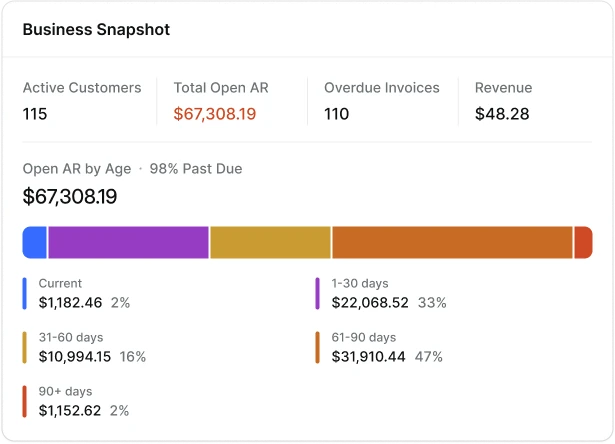
Business Snapshot
Pin to Jane’s Dashboard
Active Customers
115
Total Open AR
$1,120,000.00
Overdue Invoices
110
Open AR by Age · 46% Past Due
$1,120,000.00
Current
$604,800.00
1-30 days
$268,800.00
31-60 days
$123,200.00
61-90 days
$78,400.00
90+ days
$44,800.00
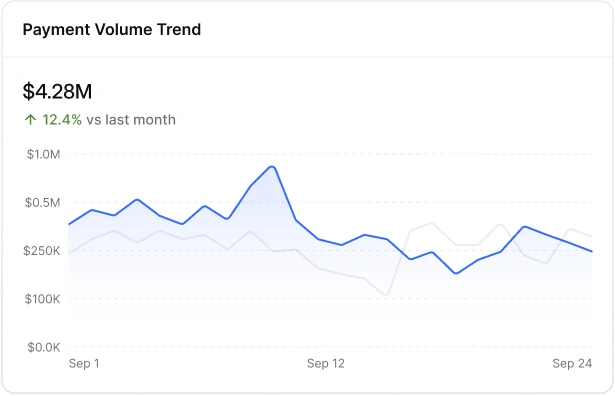
$4.28M
+12.4% vs last month
Revenue this month
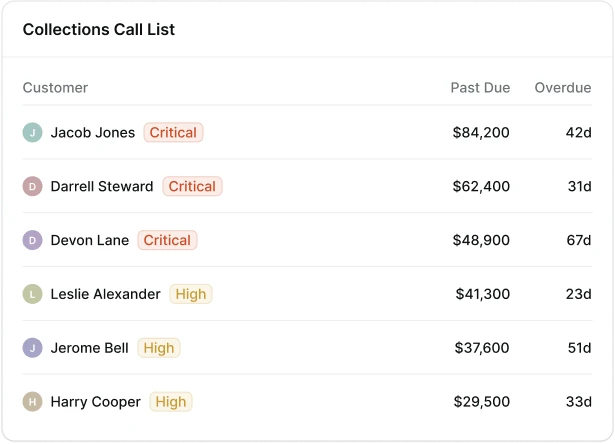
Collections Call List
Pin to Jane’s Dashboard
Customer
Past Due
Overdue
D
Devon Lane
Critical
$48,900
67d
D
Darrell Steward
Critical
$62,400
31d
J
Jacob Jones
Critical
$84,200
42d
L
Leslie Alexander
High
$41,300
23d
J
Jerome Bell
High
$37,600
51d
H
Harry Cooper
High
$29,500
33d
My Dashboard
2 widgets pinned today
Talk to your ERP.  
Get answers in real time.
So someone exports an aging report, builds a spreadsheet and decides who to chase. By the time the picture is ready, it’s already old.
THE AGING REPORT
Exported on Monday. Stale by Wednesday.
THE SPREADSHEET
Updated by whoever remembers.
THE CALL LIST
Lives in one person’s head.
Unlock your ERP's data
A 15-minute look at your own receivables: what’s slipping, who to call first and what the AI would handle for you.
Book a Demo

Four questions you ask every week.
Payra answers them, then gets to work.

01

How much was collected?

Every payment from every channel, counted the moment it lands. When the month moves off its usual pace, Payra AI tells you why before you go looking.

02

Who owes me, and how much?

Open receivables by age, live from your ERP. Click any bucket to see the invoices behind it. Payra AI drafts the reminders before an invoice slips into the next bucket.

03

Who do I call first?

A call list ranked every morning by amount, days late and how each customer has been paying lately. When someone’s habits change, Payra AI moves them up.

04

How can I improve DSO?

See how fast you get paid, month by month, and which customers are speeding up or slowing down. Payra AI suggests the next move, like offering autopay, and waits for your OK.

Collected this month
Last 30 days
$4.28M
↑ 12.4% vs last month
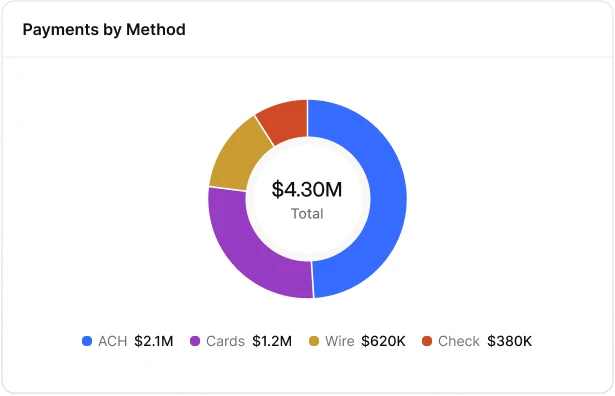
BY METHOD
ACH
$2.10M
49%
Card
$1.20M
28%
Wire
$620K
15%
Check
$360K
8%
Noticed
You collected 12% more than last month. Most of the lift came from three customers paying early.
Payra AI · 2 min ago
Open receivables by age
As of today
$1,120,000
46% past due
Current
$604,800
54%
1-30 days
$268,800
24%
31-60 days
$123,200
11%
61-90 days
$78,400
7%
90+ days
$44,800
4%
Click any bucket to see the invoices behind it.
Drafted
Reminders ready for 7 invoices that just crossed 60 days.
Waiting for your OK
View or edit draft
Approve & send
Collections call list
Ranked for today
Customer
Past due
Late
Bayview Mechanical
Critical
$84,200
42d
Kessler & Sons
Critical
$62,400
67d
Northgate Landscaping
Critical
$48,900
31d
Tri-County Plumbing
High
$41,300
23d
Summit Fleet Services
High
$37,600
51d
Ridgeway Electric
High
$29,500
33d
Prioritized
Kessler & Sons moved up: 67 days late and paying slower every month.
Payra AI · ranked this morning
Days to get paid (DSO)
May to Oct
47 days
↓ 14 days since May
May
Jun
Jul
Aug
Sep
Oct
BIGGEST CHANGES THIS QUARTER
Harbor Fence Co.
Paying 12 days faster
Kessler & Sons
Paying 18 days slower
Tri-County Plumbing
Paying 6 days faster
Suggested
Offer autopay to 4 customers whose payments are slowing down.
Payra AI · based on the last 90 days
View or edit draft
Approve & send

Ask. Answered. Acts.

Type a question the way you’d ask your controller. Payra AI answers with a number, a list or a chart, and lines up the next step: a reminder, a pay link, a call. Nothing reaches a customer until you say so.

TRY ASKING
Which invoices are over 60 days?
What did we collect by card last month?
Who paid late twice this quarter?
Which customers owe us more than $50K?
How much is due this week?
How has our DSO moved since May?
Which pay links were opened but not paid?
Who hasn’t replied to their last reminder?
Show me cash collected by week.
Which customers got slower to pay this quarter?
Ask Payra
Which customers got slower to pay this quarter?

3 customers are paying slower than last quarter. Kessler & Sons slipped the most: 18 days, with $62,400 still open.

Kessler & Sons
+18 days
$62,400
Summit Fleet Services
+11 days
$37,600
Ridgeway Electric
+7 days
$29,500
Send reminders
Pin to dashboard
Ask anything about your receivables
Ask
Payra does the work. You keep full control
Payra AI handles the reading and the sorting on its own. Anything that touches a customer or your money waits for a person to approve it.
ON ITS OWN
Reads every payment and invoice
Matches payments to open invoices
Ranks today’s call list
Flags what changed and why
With your approval
Sends reminders and pay links
Reaches out to a customer for the first time
Suggests autopay or new terms
Modify credit limits
ALWAYS ON RECORD
Posted back to your ERP
Every action logged in an audit trail
Who approved what, and when
Modify any automation
Book a Demo

Build the view you
check every morning.

Payra AI keeps each one current and leaves a one-line note when a number moves.
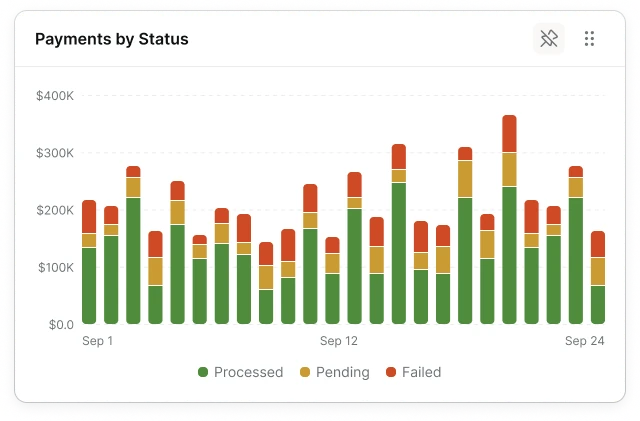
Payments by Status widget
Payment Volume Trend widget
Payments by Method widget
Collections Call List widget
Business Snapshot widget

Pin what matters

Add a widget once and it stays on your dashboard. Unpin it when you’re done with it.

Notes from Payra AI

When a number moves, Payra explains why in one line, right on the widget. No digging through reports.

Drill into the detail

Click any number to see the payments and invoices behind it, straight from your ERP.

Inside your ERP. Not next to it.

Most tools export your data, match it somewhere else, and send it back. Payra works from inside the system you already run, so every match lands on the right invoice and GL account, where your team already looks.

Book a Demo

Instant

Business insights

75%

fewer customer calls and follow-ups

0

spreadsheets to keep up to date

Questions,
answered.

Where does the data come from?

Straight from your ERP and from the payments Payra processes. Nothing to export or upload.

What does Payra AI do without asking?

[To confirm] It reads, matches, ranks and flags on its own. Anything that reaches a customer, like a reminder or a pay link, waits for your OK.

Can I turn the AI off?

[To confirm] Yes. Each automation can be switched off on its own, and the dashboard keeps working without it.

What can I ask Payra?

Questions about your payments, invoices and customers, in plain English. Payra answers with a number, a list or a chart.

Can I see the invoices behind a number?

Yes. Click any number or bar to see the payments and invoices that make it up.

How often does it update?

Every time a payment or an invoice changes in your ERP.

Unlock the data
in your ERP

15 minutes, no commitment. We’ll show you the integration with your ERP and a realistic path to go live.

Book a Demo